
Finding the Best IPTV Players 2026 is essential for transforming your Firestick, Android TV, and PC experience this year...

The landscape of IPTV players is continuously evolving, with 2026 bringing refined user experiences, enhanced compatibility, and advanced features across popular platforms like Firestick, Android TV, and PC. Choosing the right player can significantly elevate your streaming, offering everything from intuitive navigation and comprehensive Electronic Program Guide (EPG) support to robust multi-playlist management and seamless integration with various IPTV services. This guide synthesizes the most credible insights to present the top contenders, ensuring you make an informed decision for your digital entertainment needs.
Highlights: Key Insights for 2026 IPTV Players
TiviMate remains the gold standard for Android-based devices, praised for its polished interface, smooth navigation, and extensive EPG integration, especially on Firestick and Android TV.
IPTV Smarters Pro offers unparalleled versatility with user-friendly setup, broad compatibility with M3U playlists and Xtream Codes, and robust features for both beginners and advanced users across all platforms.
XCIPTV stands out for customization and advanced features, providing a modern design, EPG, watch lists, and crucial built-in VPN compatibility for secure and flexible streaming.
The Premier IPTV Players of 2026: A Deep Dive
In 2026, the demand for reliable and feature-rich IPTV players remains high. Our analysis reveals a clear consensus on several top-tier applications that consistently deliver exceptional performance and user satisfaction across Firestick, Android TV, and PC platforms. These players are recognized for their stability, comprehensive feature sets, and ability to enhance the IPTV viewing experience.
TiviMate: The Apex of Android IPTV Experience
TiviMate consistently ranks as the top choice for users on Android-based devices, including Firestick and Android TV. Its reputation stems from a meticulously designed interface that prioritizes user experience, offering seamless navigation and a visually appealing layout. The player excels in EPG support, providing a rich, TV-like browsing experience for channels.
Unrivaled User Interface and Navigation
TiviMate's user interface is often described as intuitive and polished, making it incredibly easy to browse channels, access program information, and manage playlists. This attention to detail ensures that users, regardless of their technical proficiency, can quickly adapt and enjoy their IPTV content.
Advanced Features for Power Users
While user-friendly, TiviMate also caters to power users with its premium version, unlocking a suite of advanced features such as multi-playlist management, catch-up TV, recording capabilities, and parental controls. These functionalities provide a comprehensive solution for those seeking a highly customizable and robust IPTV experience.

TiviMate's sleek interface, a hallmark of its premium streaming experience.
IPTV Smarters Pro: The Versatile and Reliable Choice
IPTV Smarters Pro stands out for its broad compatibility and ease of use, making it a favorite for both beginners and seasoned IPTV users. Its ability to support various playlist formats, including M3U and Xtream Codes API, ensures compatibility with almost any IPTV service available. Available natively on Firestick, Android TV, and Windows, it offers a truly cross-platform experience.
Seamless Integration and Setup
One of IPTV Smarters Pro's key strengths is its straightforward setup process. Users can easily configure their IPTV service using login details, M3U URLs, or Xtream Codes, allowing for quick access to their content library. The inclusion of VOD (Video-on-Demand) integration further enhances its appeal, providing a unified platform for live TV and on-demand content.
Robust Performance Across Devices
Frequent updates and optimizations ensure IPTV Smarters Pro delivers stable performance, even with 4K streams, minimizing buffering and enhancing the overall viewing quality. Its multi-language support and user-friendly EPG contribute to its reputation as a highly reliable and adaptable player.
XCIPTV: Customization and Security in Focus
XCIPTV player has garnered significant attention for its modern design, extensive customization options, and built-in features that cater to a wide range of user preferences. It supports multiple playlists and offers a rich EPG, ensuring users have detailed program information at their fingertips.
Designed for Modern Streaming
With features like watch lists, channel groups, and theme customization, XCIPTV provides a highly personalized streaming environment. Its compatibility with Xtream UI portals makes it particularly efficient for services using this architecture, simplifying content access and management.
Enhanced Security with VPN Compatibility
A notable feature of XCIPTV is its built-in VPN compatibility, a crucial aspect for users prioritizing privacy and security while streaming. This integration allows for a more secure connection without the need for a separate VPN application running in the background, offering peace of mind to users.
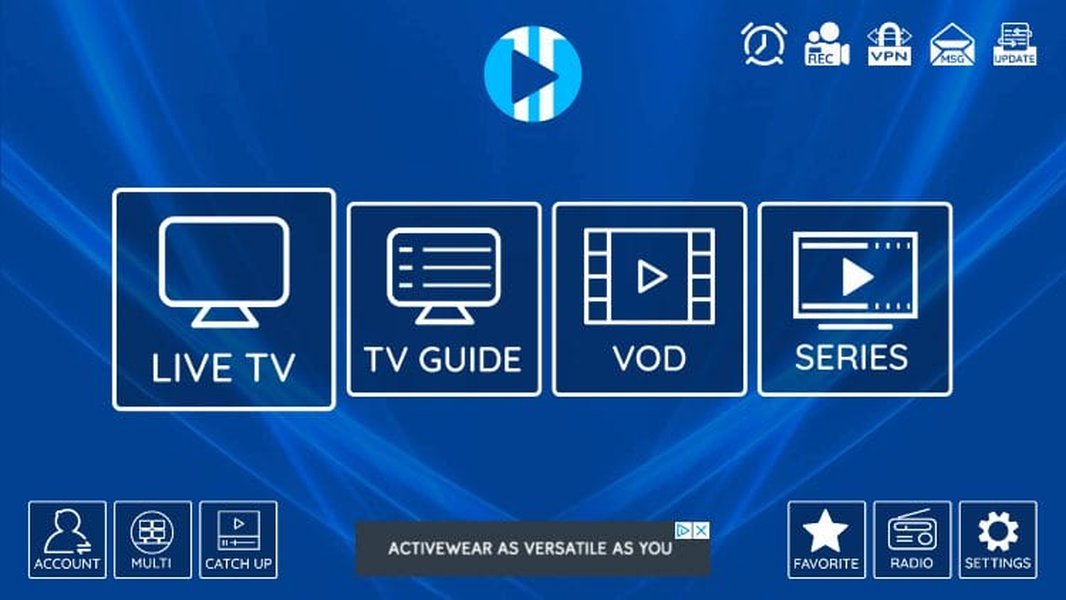
XCIPTV's intuitive interface displaying channel listings.
Televizo IPTV Player: Simplicity Meets Efficiency
Televizo IPTV Player is celebrated for its lightweight design and focus on core IPTV functionalities. It's an excellent choice for users who prefer a clean, uncluttered interface and efficient performance, particularly on devices with limited resources. Its rapid loading of M3U playlists and strong EPG features make it highly effective for live TV consumption.
Optimized for Resource-Light Operation
Televizo's design philosophy minimizes bloatware, ensuring it runs smoothly on a wide array of devices, including older Firestick models and Android TV boxes. This efficiency doesn't compromise quality, as it maintains excellent playback performance and quick channel switching.
Neutro IPTV Player: A Solid Performer for PC and Android
Neutro IPTV Player emerges as a reliable option, especially for PC users, offering robust support for M3U/M3U8 playlists and XC/XUI portals. Its availability on the Microsoft Store simplifies installation for Windows users, while Android users can easily sideload it onto their devices, including Firestick.
Comprehensive Playlist and Portal Support
Neutro's ability to handle various playlist formats and portal types makes it a versatile player. It supports username and password authentication for portals and offers features like movie and TV series organization, contributing to a structured viewing experience.
Understanding IPTV Player Capabilities: A Radar Chart Analysis
To further illustrate the strengths of these top IPTV players, we've created a radar chart that evaluates them across key performance indicators. This chart provides a visual comparison, helping you quickly identify which player aligns best with your priorities.
This radar chart visually represents how each player performs across critical attributes. TiviMate excels in user interface and advanced features, while IPTV Smarters Pro shines in cross-platform compatibility and performance stability. XCIPTV maintains a strong balance, particularly in advanced features and customization. Televizo is noted for its performance stability and efficiency, and Neutro offers solid multi-playlist support and overall performance.
Key Features and Considerations for IPTV Players
When selecting an IPTV player, several factors come into play beyond the top five rankings. These considerations can significantly impact your streaming experience.
Compatibility Across Devices
The ideal IPTV player offers seamless functionality across your preferred devices. While many players support Firestick and Android TV natively, PC compatibility often requires sideloading or using Android emulators like BlueStacks. Verify the installation methods and ensure the player integrates well with your ecosystem.
Firestick and Android TV Integration
For Firestick and Android TV users, players with optimized interfaces for large screens and remote control navigation are paramount. Direct installation via app stores (Google Play) or downloader apps is a significant convenience.
PC Functionality (Windows/Mac)
PC users might find dedicated Windows applications in the Microsoft Store or rely on emulators for Android-based players. Features such as M3U playlist handling and portal support are crucial for desktop use.
EPG (Electronic Program Guide) Support
A comprehensive and intuitive EPG is essential for a traditional TV viewing experience. The best players integrate EPG data smoothly, allowing users to browse schedules, view program details, and plan their viewing seamlessly.
Playlist Management and Xtream Codes Support
The ability to manage multiple IPTV playlists and support for Xtream Codes API or M3U/M3U8 URLs offers flexibility and compatibility with various IPTV service providers. This ensures you can easily switch between services or consolidate them within a single player.
Advanced Features and Customization
From recording capabilities and catch-up TV to parental controls and multi-view options, advanced features enhance the overall utility of an IPTV player. Customization options, such as themes and channel grouping, allow users to tailor the interface to their liking.
Visualizing IPTV Player Feature Priorities: A Bar Chart Perspective
This bar chart highlights the importance of various features based on common user priorities in 2026. Understanding these priorities can guide your decision-making process.
This bar chart underscores the high importance users place on performance and speed, closely followed by excellent user interface quality and robust multi-device support. While recording and catch-up features are valued, they typically fall below fundamental streaming capabilities and ease of use in terms of priority.
Understanding Your IPTV Ecosystem: A Comparison Table
To provide a clear, concise overview, the table below compares the key attributes of the leading IPTV players for Firestick, Android TV, and PC in 2026, helping you make an informed decision based on your specific needs.
Player Name | Primary Strengths | Key Features | Supported Platforms | Pricing Model |
|---|---|---|---|---|
TiviMate | Polished UI, robust EPG, advanced features | Multi-playlist, recording, catch-up, parental controls, search, multiview | Firestick, Android TV, PC (via emulator) | Freemium (Premium for advanced features) |
IPTV Smarters Pro | Versatility, broad compatibility, user-friendly | M3U/Xtream Codes, VOD, multi-language, EPG, multi-screen | Firestick, Android TV, PC (native Windows app) | Freemium (Premium for advanced features) |
XCIPTV | Customization, modern design, VPN compatibility | EPG, watch lists, channel groups, themes, subtitles, multi-audio | Firestick, Android TV, PC (sideload/emulator) | Freemium (Ad-free premium) |
Televizo IPTV Player | Lightweight, efficient, simple interface | Fast M3U loading, strong EPG, grouping features | Firestick, Android TV, PC (sideload) | Free |
Neutro IPTV Player | Solid PC performance, comprehensive portal support | M3U/M3U8, XC/XUI portals, EPG layouts, movie/TV series organization | PC (Microsoft Store), Android (APK), Firestick (APK) | Free |
Enhancing Your IPTV Experience: Video Guide for IPTV Smarters Pro
For those looking to dive deeper into the setup and functionality of one of the most popular IPTV players, IPTV Smarters Pro, this video offers a comprehensive guide. It walks you through the installation and configuration process on various devices, ensuring you can quickly get your streaming service up and running.
is highly relevant as it provides a practical, step-by-step tutorial for installing and configuring IPTV Smarters Pro on a PC. Given the player's prominence across Firestick, Android TV, and PC, understanding its setup process is crucial for users, especially those new to IPTV or looking to optimize their PC streaming experience. The guide simplifies the process, addressing common setup challenges and ensuring a smooth transition to using this powerful player.
Frequently Asked Questions (FAQ)
What is an IPTV player?
An IPTV player is an application that allows you to stream content from your Internet Protocol Television (IPTV) service provider. It acts as an interface to organize and play live TV channels, movies, and series provided by your IPTV subscription.
Is it legal to use IPTV players?
Using an IPTV player itself is legal. However, the legality depends on the IPTV service you subscribe to. Always ensure your IPTV service provides content through legal and legitimate sources to avoid copyright infringement.
Do I need a VPN when using an IPTV player?
While not strictly mandatory for the player itself, using a VPN (Virtual Private Network) is highly recommended for privacy and security when streaming IPTV content. A VPN encrypts your internet traffic, protecting your online activities from surveillance and potentially bypassing geo-restrictions.
Can I record shows with these IPTV players?
Many premium IPTV players, such as TiviMate and IPTV Smarters Pro (with their premium versions), offer recording capabilities. This feature allows you to record live TV programs and watch them later at your convenience.
How do I install these players on Firestick?
For Firestick, you typically install IPTV players by sideloading their APK files using the Downloader app. Some players might have direct apps available, but sideloading is a common method for many third-party applications not found in the Amazon Appstore.
Conclusion
The 2026 landscape for IPTV players on Firestick, Android TV, and PC is rich with excellent options, each offering a unique blend of features, usability, and performance. TiviMate remains the top choice for its premium user experience on Android devices, while IPTV Smarters Pro offers unmatched versatility and ease of use across all platforms. XCIPTV stands out for its customization and integrated security features. For users prioritizing efficiency and simplicity, Televizo IPTV Player is a strong contender, and Neutro IPTV Player provides a robust solution, particularly for PC users. Regardless of your chosen platform or specific needs, selecting a player from this curated list will significantly enhance your IPTV streaming experience, providing a seamless and enjoyable way to access your favorite content.
Test These Players with a Free Trial
Every IPTV player requires active M3U or Xtream Codes credentials. You can test IPTV Smarters, TiviMate, or IBO Player right now with our risk-free demo.